
How to find the right bobbin for your sewing machine
The safest way to identify a sewing machine bobbin is to start with the exact machine model, then confirm the bobbin in the manufacturer's manual or compatibility information. Part number, bobbin class, material and dimensions are useful cross-checks after that.
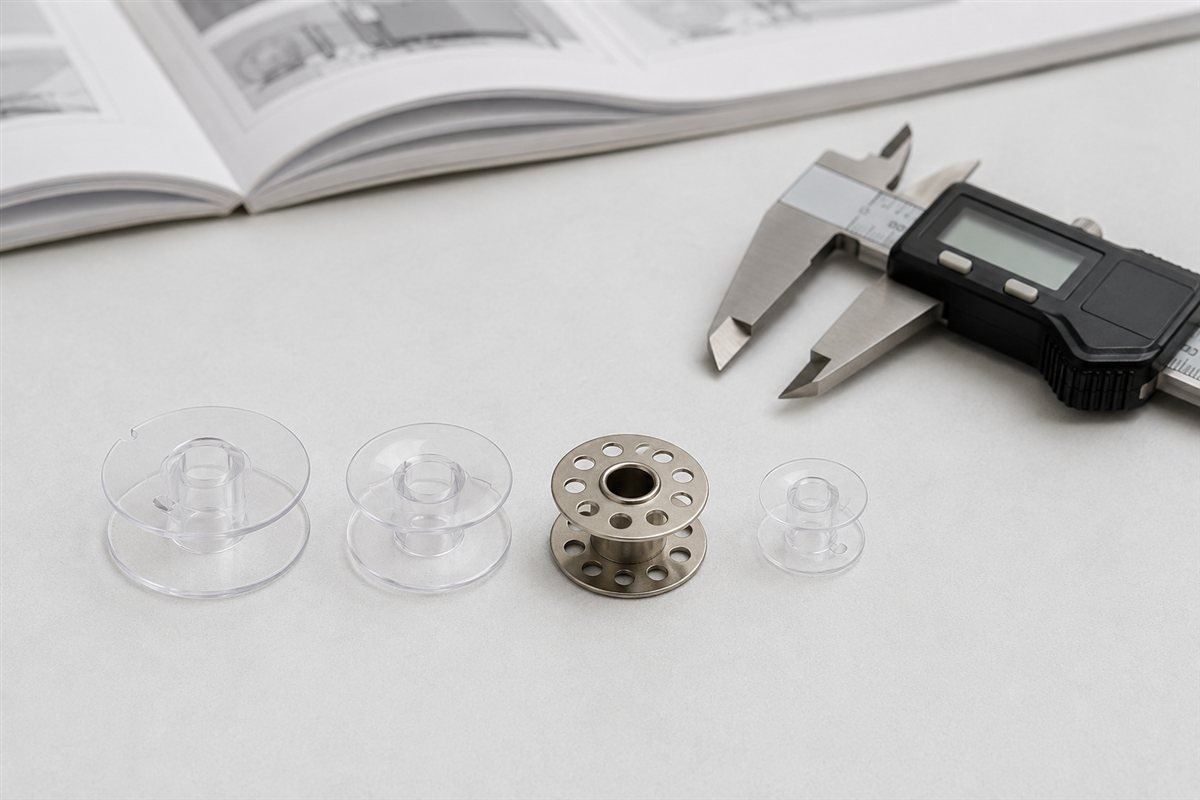
Appearance alone isn't enough. A bobbin can drop neatly into the machine and still be the wrong one.
| What you have | How useful it is |
|---|---|
| Exact machine model plus manufacturer manual or support page | Best evidence |
| OEM bobbin part number explicitly listed for the model | Very strong |
| Manufacturer-specified bobbin class, style and material | Strong |
| Measurements, shape and markings from an existing bobbin | Useful identification clues |
| A seller calling a bobbin “universal” | Weak unless your exact model is documented |
| A bobbin simply fitting into the bobbin area | Not proof of compatibility |
Start with the exact machine model
“Brother sewing machine” or “Janome Memory Craft” isn't specific enough.
Manufacturers can use several bobbin systems across one brand, and sometimes across machines that look quite similar. Find the complete model number from the machine label and use that as the starting point.
If the machine is already in SewFitGuide, search your sewing machine model first. A published compatibility relationship is more useful than trying to identify a loose bobbin from appearance.
Keep letters, numbers and suffixes intact. A model family can contain machines with different accessories, and a suffix that looks unimportant may identify a different version.
Check the manual before measuring anything
The instruction manual is usually the cleanest place to look.
Search it for terms such as “bobbin”, “winding the bobbin”, “installing the bobbin”, “accessories” and “replacement parts”. Depending on the manufacturer, you may find an OEM part number, a bobbin class, a material requirement, a measurement or an illustration of the correct shape.
A manufacturer accessory page can be just as useful when it provides an explicit model compatibility list.
This matters because bobbin names aren't wonderfully consistent. The same broad class name can appear in different product descriptions, while a manufacturer may also use its own accessory number. Apparently one naming system would have been too easy.
Use the OEM part number when one is available
An exact manufacturer part number is one of the best identifiers you can have.
Brother, for example, sells the Brother SA156 Bobbin for a large group of its sewing and embroidery machines. Brother describes SA156 as a clear plastic Class 15 type bobbin and specifies its depth as 7/16 inch.
That is much more useful than shopping for something labelled only “plastic bobbin”.
The same principle applies to other brands. Janome identifies its Janome Standard Bobbin as part 102261103. Part numbers are less charming than product names, but considerably better at ordering the right part.
A part number still has to belong to the correct machine. Don't assume that two bobbins from the same manufacturer are interchangeable simply because both are genuine parts.
Measure a bobbin as a cross-check, not as proof
If the manual has disappeared and the machine came with a box of anonymous bobbins, measurements become useful.
A digital caliper makes the small differences easier to see. Check the outside diameter and the overall height or depth from one flange to the other.
Then look at the physical details.
- Are the top and bottom surfaces flat or curved?
- Is the bobbin plastic or metal?
- Are there molded letters or numbers?
- Does it have a notch or other feature used by the bobbin winder?
- Does the centre opening and general profile match the documented part?
These observations can help identify a candidate bobbin. They do not establish compatibility on their own.
Two bobbins can share one measurement and differ somewhere else. The machine's hook, bobbin case, winding system or sensors may still require a particular design.
Plastic and metal aren't automatically interchangeable
Material can be part of the specification.
Some machines are designed for a particular plastic bobbin. Others use metal. Treating material as an aesthetic choice is a good way to turn a five-minute parts search into an afternoon of wondering why the machine suddenly behaves differently.
Brother, for example, tells owners of its SA156 machines to use the specified plastic bobbin and not substitute metal bobbins. Other Brother models use the metal SA159 system instead.
Follow the specification for the exact machine rather than assuming that the metal version of a similar-looking bobbin is an upgrade.
SINGER Class 15 and Class 15J show why appearance isn't enough
SINGER's own bobbin guidance is a useful example because the differences are visible but not dramatic.
The SINGER Class 15 Transparent Bobbin has flat top and bottom surfaces. SINGER lists it at about 12 mm high and 21 mm in diameter.
The SINGER Class 15J Bobbin is slightly smaller in SINGER's specification, with slightly curved top and bottom surfaces. SINGER explicitly says not to substitute Class 15J for its Class 15 transparent or metal bobbins, or the other way around.
Put the two on a table and the distinction is easy to underestimate. Inside a sewing machine, “almost the same” isn't a useful specification.
There is enough confusion around these two that they deserve their own guide. For now, the useful rule is simpler: if SINGER specifies Class 15J, use Class 15J. If it specifies Class 15 Transparent, use that instead.
Brother shows why the brand name isn't enough
Brother's range gives another useful warning against buying by brand alone.
Many Brother domestic sewing and embroidery machines use SA156, a clear plastic Class 15 type bobbin. Brother also specifies SA159 Class 96 Type L metal bobbins for a different group of machines.
Both are Brother bobbins. They are not one Brother bobbin system.
The exact model decides which relationship matters.
This is why a search for “Brother bobbin” is useful for shopping only after the machine has been identified. For compatibility research, start with “Brother + exact model number + bobbin”.
Janome has a broad standard with important exceptions
Janome's Standard Bobbin shows the other side of the problem.
Janome identifies part 102261103 as its clear standard bobbin, marked with the letter J. Its official compatibility information says the bobbin works with Janome sewing and embroidery machines except the 1600P, HD9, MB4 and MB7.
Those exceptions are exactly why “most Janome machines use this” and “my Janome uses this” are two different claims.
The broad rule is useful. The model-specific check is what makes it safe to act on.
Be suspicious of the accessory box that came with a used machine
A second-hand machine often arrives with an impressive collection of presser feet, needles and bobbins. That doesn't mean all of them belong to it.
Previous owners accumulate parts. Machines get sold with whatever happened to be in the drawer. A loose bobbin should therefore be treated as evidence to compare, not as proof of what the machine requires.
Start with the machine model. Find the documented bobbin. Then compare the loose bobbins against it.
If the documentation and the accessory box disagree, trust the documentation.
Damaged bobbins aren't good reference samples either. A chipped, bent or warped bobbin should be replaced rather than used as the master pattern for buying more.
Don't identify a bobbin from one clue
Several shortcuts sound reasonable and aren't reliable enough on their own.
A drop-in bobbin system doesn't identify one universal bobbin. Neither does a front-loading bobbin case. Matching diameter alone isn't enough, and a product description saying “fits most sewing machines” doesn't establish compatibility with yours.
The same applies to colour. Transparent, tinted and metal bobbins can provide useful identification clues, but colour isn't a compatibility standard.
The goal isn't to find something that physically enters the machine. It is to identify the bobbin the machine was designed to use.
What to do when the documentation is unclear
Older machines are sometimes harder. Manuals disappear, manufacturer sites change, and accessory numbers get replaced.
Use the strongest evidence you can find. Original manuals and manufacturer documentation come first. Strong specialist parts documentation can help with discontinued machines when the original material is no longer available.
If credible sources disagree, don't smooth the disagreement away. Check whether they refer to different regions, production revisions or model suffixes.
SewFitGuide's compatibility verification method explains how those source differences are handled.
Find the bobbin from the machine, not the other way around
The quickest route is normally:
- Identify the exact manufacturer and model.
- Find the model in the manual, manufacturer support material or SewFitGuide search.
- Record the specified bobbin class and OEM part number.
- Check whether the manufacturer specifies plastic or metal.
- Use dimensions and shape to confirm that the physical bobbin matches the documented one.
The Parts & Systems directory can then be used in the other direction. Open a published bobbin page to see the machines currently linked to that part or system.
If SewFitGuide has a machine page but doesn't yet list its bobbin, that means the relationship hasn't been verified for publication. It does not mean the machine has no compatible bobbin.